<?xml version="1.0" encoding="utf-8"?>
<feed xmlns="http://www.w3.org/2005/Atom">
  <title><![CDATA[manicwave]]></title>
  <link href="http://manicwave.com/blog/atom.xml" rel="self"/>
  <link href="http://manicwave.com/blog/"/>
  <updated>2014-03-25T08:26:46-04:00</updated>
  <id>http://manicwave.com/blog/</id>
  <author>
    <name><![CDATA[Jeff Schilling]]></name>
    
  </author>
  <generator uri="http://octopress.org/">Octopress</generator>

  
    <entry>


<title type="html"><![CDATA[Sharpening the code coverage saw]]></title>
<link href="http://manicwave.com/blog/2010/03/04/sharpening-the-code-coverage-saw/"/>
<updated>2010-03-04T11:48:23-05:00</updated>
<id>http://manicwave.com/blog/2010/03/04/sharpening-the-code-coverage-saw</id>
<category term="Blog" /><category term="Unit Testing" /><category term="cocoa" /><category term="xcode" />

      <content type="html"><![CDATA[<p>Here's a quick followup to my <a href="http://www.manicwave.com/blog/2010/03/01/that-feels-better-cocoa-hudson-and-running-green/">Hudson - Cocoa - Coverage Reporting blog post</a> from the other day.</p>

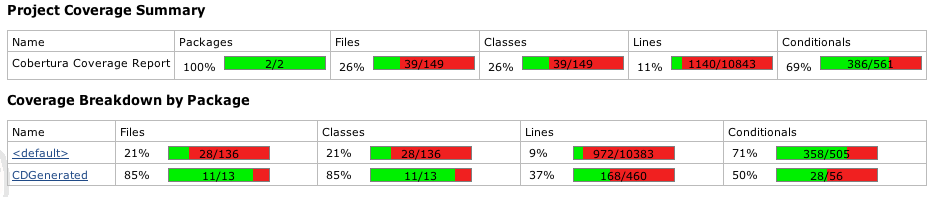
<p>I didn't show the summary output that Cobertura displays in Hudson.  It looked
like this:</p>

<p><img src="http://manicwave.com/blog/images/2010/03/coverage-before.png" alt="Coverage before cleanup" /></p>

<p>You'll note (or I will do so for you) that there's a variety of packages here
(in the cocoa case, these are just subdirectories of the current workspace).</p>

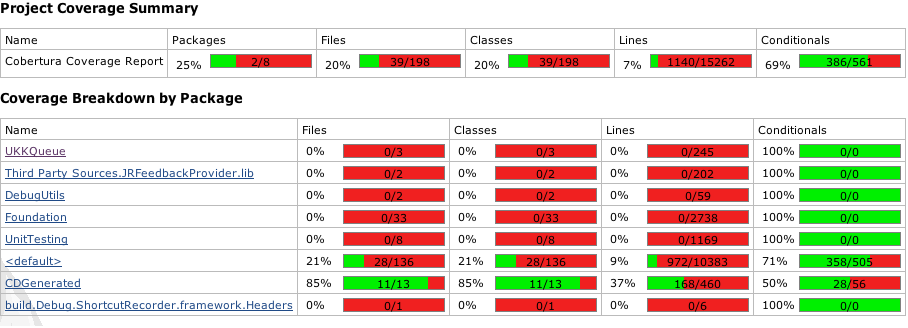
<p>Notwithstanding the anemic percentages of coverage overall, outside of the
<default> and CDGenerated packages, these are all third party components.
While I'm extremely interested in knowing that they work correctly, it's not
on my radar to build out test coverage for each of these.</p>

<p>What I want is accurate reporting for the code that I write.</p>

<p>When we setup the gcovr build step in Hudson, the command looked like this:</p>

<p>/usr/local/bin/gcovr -r . -x -b -e /Developer  1> html/coverage.xml
2>/dev/null</p>

<p>The -e /Developer command line argument instructs gcovr to <em>exclude</em> any files
with names that match /Developer.  The final config that I'm now working with
is:</p>

<p>/usr/local/bin/gcovr -r . -x -b -e /Developer -e '.<em>/UKKQueue/' -e
'.</em>/DebugUtils/' -e '.<em>/Foundation/' -e '.</em>/UnitTesting/<em>' -e '.</em>/Third Party
Sources/' -e '.*/ShortcutRecorder.framework/' 1> html/coverage.xml 2>/dev/null</p>

<p>Which is obtuse at best, but works.  The '.*/xxx/' is necessary because the
fully qualified path is processed by gcovr.  In my case it would be
/Users/jschilli/.hudson/jobs/Tickets-MASTER/workspace/...</p>

<p>The results now look like this:</p>

<p><img src="http://manicwave.com/blog/images/2010/03/coverage-after.png" alt="coverage chart after tweaks" /></p>

<p>The absolute measure of coverage for each of the two remaining packages has
not changed, but the information is now focused on the data that is most
important to me.</p>

<p>With all of that said, the exclusions you choose to add are project specific.
Hopefully this will help you hone the reporting to your liking.</p>
]]></content>
    </entry>
  
    <entry>


<title type="html"><![CDATA[That feels better - Cocoa, Hudson and running green]]></title>
<link href="http://manicwave.com/blog/2010/03/01/that-feels-better-cocoa-hudson-and-running-green/"/>
<updated>2010-03-01T23:18:44-05:00</updated>
<id>http://manicwave.com/blog/2010/03/01/that-feels-better-cocoa-hudson-and-running-green</id>
<category term="Blog" /><category term="Unit Testing" /><category term="cocoa" /><category term="xcode" />

      <content type="html"><![CDATA[<h2>Continuous Integration</h2>

<p>Continuous Integration (CI) has been around for a while now. Popularized in
the java/ruby/[<em>lang</em>] communities, CI, when properly implemented promotes
good code practices.  CI alone won't guarantee great code, but it helps
support good behavior and in fact rewards users routinely and reliably.</p>

<p>I've used Continuous Integration in many former lives - CI was essential on
large geographically distributed teams - driving out incompatibilities in
interface and implementation early and often.</p>

<p>My definition of a successful CI system and implementation are:</p>

<ol>
<li>Automated and unattended application build</li>
<li>Automated and unattended test execution
Everything beyond that is gravy (or sugar).</li>
</ol>


<h2>CI &amp; the indie</h2>

<p>When I released my first iPhone app, I was building the project in Xcode,
switching to Finder and/or Terminal.app, compressing, copying and generally
screwing up at every possible step.  Although I've seen the benefits of
automation multiple times, I was so busy getting this app out that I couldn't
see how I could take the time to write scripts.  That airlock of paradox
didn't last long.  I wrote a few scripts and every aspect of my
build/sign/archive workflow was automated - when I ran the script.</p>

<p>I repeated this exercise for my first Mac product - this time a hodge-podge of
scripts to build the app, generate the help files, generate the sparkle
appcast, release notes, upload, etc.  I still use this script and it works
great - when I run the script.</p>

<p>Although I've had great success with CI in the past, I wasn't convinced that
my one workunit indie shop could or would benefit from implementing CI.  There
were a few things that helped turn me around on this:</p>

<ol>
<li>The weakness of my script based build system continues to be the user centered part - me running the scripts.  As I bounce from machine to machine, branch to branch, tucking frameworks away on one machine and not replicating them to another, [insert favorite 'in the heat of the battle' screwup here], issues might not emerge for some time.</li>
<li>Increased desire to capture metrics and data about my personal development process.  I'm not implementing heavy weight metrics, but I understand absolutely that data can empower me to make decisions - test data, build data, coverage data.</li>
<li>Renewed belief that removing rote non value-adding activities from my routine will increase my effectiveness and throughput</li>
</ol>


<h2>Rule #1 of CI - Automated and Unattended Build</h2>

<p>When something changes, your CI should build the system to ensure that nothing
has broken.  If you're in the zone and a failure pops up - easy to fix.  If
you find an issue weeks later - well we've all been there.</p>

<p>CI is all about automating those rote tasks.  It is important to emphasize
both the automated aspects as well as the unattended aspects of CI.  The only
thing worse than no CI is CI that is broken and neglected.  We'll come back to
this point in a bit.</p>

<h2>Hudson CI &amp; Cocoa</h2>

<p>There are several compelling CI solutions in the market -
<a href="http://cruisecontrol.sourceforge.net/">CruiseControl</a>,
<a href="https://hudson.dev.java.net/">Hudson</a> and scores of others in the opensource
space.  There are a spectrum of commercially available solutions as well
including <a href="http://www.atlassian.com/software/bamboo/">Bamboo</a>.  To my
knowledge, there are no CI solutions that focus on the Cocoa space [just found
<a href="http://bleepsoft.com/buildfactory/">BuildFactory</a> - haven't checked it out].
The good news is that most of these systems can run external processes - the
by-product is good news for cocoa devs.</p>

<p>Hudson seems to be the leading choice - it's really straight forward to get
the basics working.  From there, incremental tweaks should get you up and
running.</p>

<p><a href="http://www.atlassian.com/software/bamboo/"></a></p>

<h2>Preparing for the move</h2>

<p>I screwed up more than a few times getting my apps to build in Hudson.  There
are <a href="http://blog.jayway.com/2010/01/31/continuos-integration-for-xcode-%0Aprojects/">more</a> than <a href="http://osx-ci.blogspot.com/2009_08_01_archive.html">a few pages</a> on <a href="http://nachbaur.com/blog/how-to-automate-your-iphone-app-builds-with-hudson">the web</a> that illustrate
Cocoa/Hudson builds.</p>

<p>My suggestion is to ensure that you can take a fresh cut of your project from
your SCM system, check it out to a new directory and build it clean.</p>

<p>I would encourage you to do this outside of your normal dev tree - it's
surprising how easily a relative path will find its way into your xcode build
settings.</p>

<ol>
<li>cd /tmp</li>
<li>checkout project to foobaz</li>
<li>build</li>
<li>if errors, rm -rf /tmp/foobaz, fix errors in main tree, checkin, goto #1
This process should rid you of (many of) those hidden dependencies that will
prevent a clean build once you're executing inside of Hudson.</li>
</ol>


<p>Once you have a clean repeatable build - from your scm system - you should
move on to getting hudson up and running.</p>

<h2>Setting up Hudson</h2>

<p>Installing Hudson is well documented on the net.  The Hudson site includes
<a href="http://wiki.hudson-%0Aci.org/display/HUDSON/Installing+Hudson">installation instructions</a> that work well.  There are several
examples of cocoa specific sites - I started
<a href="http://blog.jayway.com/2010/01/31/continuos-integration-for-xcode-projects/">here</a>.</p>

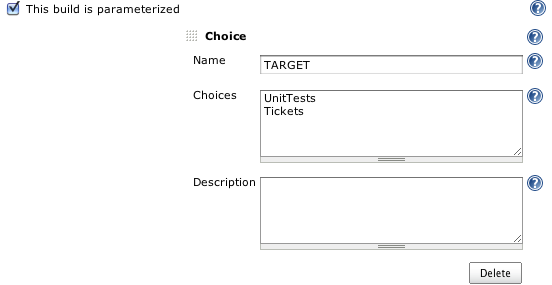
<p>Because I have multiple targets setup in my Xcode project, I selected 'This
build is parameterized' and added some targets to choose from.  Hudson will
remember your last choice.</p>

<p><a href="http://blog.jayway.com/2010/01/31/continuos-integration-for-xcode-projects/"></a><img src="http://manicwave.com/blog/images/2010/03/Parameters.png" alt="Parameterized Build Settings" /></p>

<h2>Setting up SCM</h2>

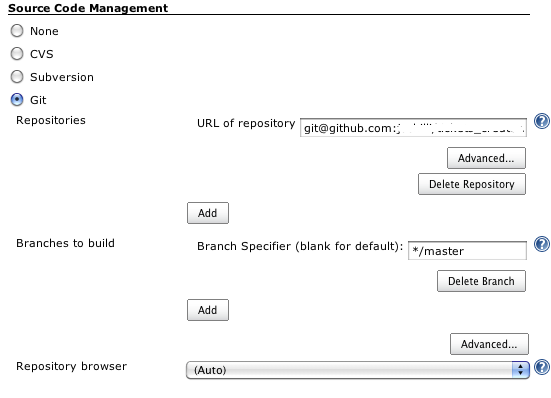
<p>If you use Git, <a href="http://blog.jayway.com/author/christianhedin">Christian Hedin</a>'s article covers that
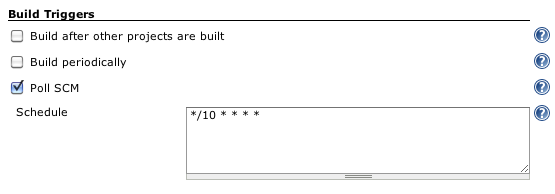
configuration as well.  The critical thing is to use either SCM polling or a
post-commit-hook to invoke the build.  Hudson will allow you to setup a time
based build e.g. build every thirty minutes.  The issue with that is that it
will execute the build whether there are changes or not.  Polling or post-
commit-hooks will ensure that builds are invoked when change occurs.</p>

<p><img src="http://manicwave.com/blog/images/2010/03/scm-config1.png" alt="scm-config.png" /></p>

<p>You will note that I've elected to only build my master branch - by default,
Hudson will checkout and build each branch that it finds in your Git repo.
While I see this as advantageous (forward dev on master, branches for
production release and bug fix), my branches haven't gotten the Hudson
CI/gcov/unit testing love that master has.</p>

<h2><img src="http://manicwave.com/blog/images/2010/03/polling.png" alt="SCM Polling " /></h2>

<h2>Setting up your project</h2>

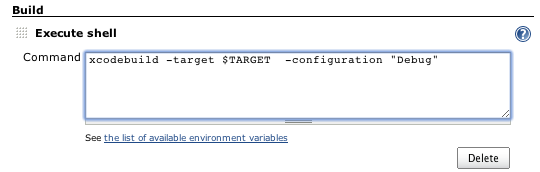
<p>In the interest of walking before I run, I want my Hudson build to checkout my
updated code, compile my code, execute unit tests and capture any reporting
output for test coverage and unit test failures.  It turns out that most of
this is already performed when I build my UnitTests target in my Xcode
projects.</p>

<p><img src="http://manicwave.com/blog/images/2010/03/build-command.png" alt="Build Step" /></p>

<p>Click on build now - you can check the console to see the steps that Hudson is
taking.</p>

<p>If the stars are aligned, you should have a successful build.  If not, you'll
need to crawl through the console logs to determine where the failure
occurred.</p>

<p>It is critical that you go back to your Xcode project/standalone build
directory and correct mistakes there.  Check in your changes and repeat.  No
one has to know how many times you repeat this cycle, but it's critical to
meet the spirit and law of Rule #1!</p>

<h2>Sugar</h2>

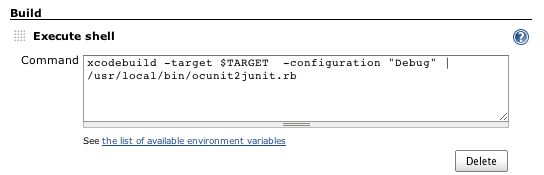
<p>Once the basic build is working you should add unit test reporting.  If you
have or are planning to run unit tests (Rule #2), download this <a href="http://github.com/ciryon/OCUnit2JUnit/blob/master/ocunit2junit.rb">ruby
script</a>,
install it in /usr/local/bin or the directory of your choice and change your
build step to look like this:</p>

<p><img src="http://manicwave.com/blog/images/2010/03/Safari.png" alt="Safari.png" /></p>

<p>In the Post-build actions, configure Hudson to publish your test results.</p>

<p><img src="http://manicwave.com/blog/images/2010/03/Safari2.png" alt="Safari.png" /></p>

<p>Trigger a build and you'll now see a chart with the build results.  As your
test suite grows, you should see a trending graph with increased numbers of
tests.</p>

<h2>Code Coverage</h2>

<p>Unit tests execution is what we're after for Rule #2, but the number of tests
as a key metric is easily misleading.  I've seen a lot of cases where the same
code is tested over and over again.  Coverage is the key indicator!</p>

<p>Download and install <a href="https://software.sandia.gov/trac/fast/export/2099%0A/fast/trunk/scripts/gcovr">gcovr</a> and install it again in /usr/local/bin</p>

<p>Add the following as a new build step (after the xcodebuild step)</p>

<p>gcovr converts gcov data into a format parseable by Cobertura - a coverage
analysis tool.</p>

<p>(See Tommy McLeod's <a href="http://osx-ci.blogspot.com/2009_08_01_archive.html">blog post</a> here for some additional details)</p>

<p><img src="http://manicwave.com/blog/images/2010/03/Safari3.png" alt="Safari.png" /></p>

<p><img src="http://manicwave.com/blog/images/2010/03/cobertura.png" alt="Cobertura Configuration" /></p>

<p>Assuming you have gcov correctly working for your project (the subject of an
as yet unwritten post), executing the build will result in some nice graphs.</p>

<p>You can now navigate through the coverage reports and see your annotated
source code including what's covered - and more importantly, what's not.
(There's a one-line patch to gcovr detailed <a href="http://issues.hudson-ci.org/browse/HUDSON-5235">here</a> that allows Cobertura/Hudson to navigate into your
code)</p>

<p><img src="http://manicwave.com/blog/images/2010/03/coverage-graph.png" alt="Safari.png" /></p>

<p>[Edit 3/2/2010 - new example showing a real miss]</p>

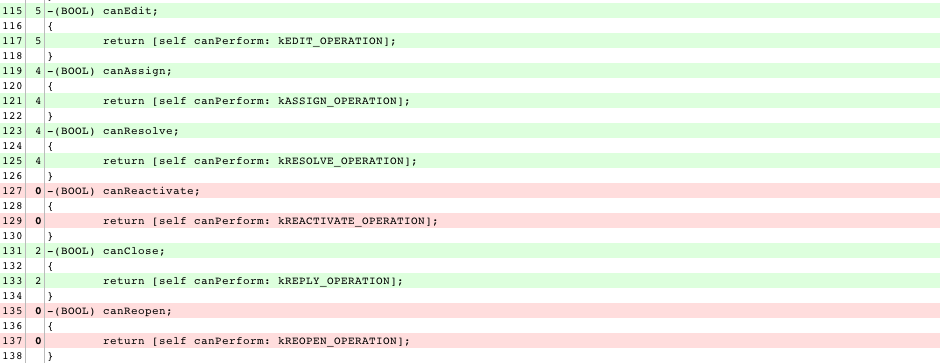
<p>This example illustrates the value of visualizing test coverage - I had ~15
valid operations on a model class - I wrote this code from the spec - I
erroneously interpreted running green on my unit tests meant all good.  In
fact, I had missed several cases - clearly identified here.</p>

<p><img src="http://manicwave.com/blog/images/2010/03/coverage-sample.png" alt="Safari.png" /></p>

<h2>Finally</h2>

<p>Make some changes in your project, commit them to your SCM system and monitor
the build.  Make a test fail, introduce a compiler error and monitor the
results.</p>

<p>You want to be able to rely on your CI system to accurately report failures.
If you have instability in the process, now is the time to grind through the
issues.</p>

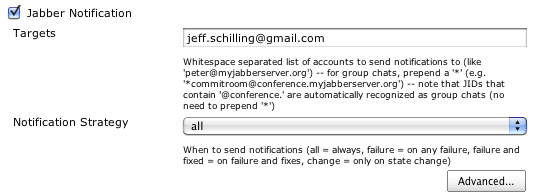
<p>You can install the Jabber notification plugin in Hudson, configure your
jabber address (or that of a group chat if you're working with multiple
people) and Hudson will now inform you of build successes and failures.  You
can also configure email.</p>

<p>The compelling aspect of the Jabber plugin is that Hudson has a jabber bot
that you can use to get status, trigger builds and more.</p>

<p><img src="http://manicwave.com/blog/images/2010/03/Jabber.png" alt="Jabber Configuration" /></p>

<p>What's left?  There are a lot of different directions you can take Hudson now
that the basics are in hand.  I want to spend some more cycles getting better
diagnostics when the build fails.  Unit test failures are clearly reported.
Compilation failures (forget to commit that new file to the build?) require
spelunking through the console log.  I also plan on moving my production
builds to Hudson, but for now, getting that jabber notification that the build
is clean is totally worth the time I've invested in setting this up.</p>
]]></content>
    </entry>
  
    <entry>


<title type="html"><![CDATA[Logitech - I want my day back]]></title>
<link href="http://manicwave.com/blog/2010/02/18/logitech-i-want-my-day-back/"/>
<updated>2010-02-18T17:33:07-05:00</updated>
<id>http://manicwave.com/blog/2010/02/18/logitech-i-want-my-day-back</id>
<category term="Blog" /><category term="Tickets" /><category term="cocoa" />

      <content type="html"><![CDATA[<p>Yesterday sucked from a productivity perspective.   I'm deep
into the development on <a href="http://manicwave.com/products/tickets">Tickets 2.0</a>
and spending a lot of time generating new versions of my Core Data based data
model.   This is a (normally) straight-forward exercise in
Xcode - Design>Data Model>Add Model Version.   The rub here
is that this works fine on my Mac Book Pro, but failed without error on my Mac
Pro.   Yesterday, I'd had enough with git commit &amp;&amp; git push
-> switch to MBPro, make data model changes -> git commit &amp;&amp; git push -> back
to Mac Pro -</p>

<p>I spent several hours trying to isolate the differences between the two setups
- same project, different rev of Xcode.   I down leveled my
Xcode install on the Mac Pro, same result - now things are weird.</p>

<p>I moved /Developer to /Developer.old - clean install.   No
Love!</p>

<p>What I observed on the failing machine was that the versioned data model was
being created in the .xcdatamodeld directory, but was not being added to the
Xcode project.pbxproj file.   Very Frustrating.</p>

<p>I grabbed Activity Monitor to watch the open files for Xcode to see if I could
determine what was going on.</p>

<p>I noticed that
<a href="http://www.stclairsoft.com/DefaultFolderX/index.html">DefaultFolderX</a> (DFX)
had a scripting addition loaded into my Xcode process.   I
disabled DefaultFolderX and  voila I was able to add my
versioned data model file.</p>

<p>Were it that this is the end of the story.   I sent a note
off to Jon Gotow at St. Clair Software with my observations.
  Jon quickly replied and asked if I was by chance using a
Logitech mouse.   I am.   He further
suggested that I look to see
if  /Library/ScriptingAdditions/LCC Scroll Enhancer
Loader.osax was being loaded.</p>

<p>I reenabled DFX and saw that indeed LCC Scroll enhancer was loaded, with
errors.   I did a quick sudo
rm  /Library/ScriptingAdditions/LCC Scroll Enhancer
Loader.osax, restarted Xcode and everything is working well again.</p>

<p>Many thanks to Jon for his quick and professional response.
  Logitech - my bill has been remitted.</p>
]]></content>
    </entry>
  
    <entry>


<title type="html"><![CDATA[Application Development Post Mortem]]></title>
<link href="http://manicwave.com/blog/2010/02/15/application-development-post-mortem/"/>
<updated>2010-02-15T07:17:26-05:00</updated>
<id>http://manicwave.com/blog/2010/02/15/application-development-post-mortem</id>
<category term="Blog" /><category term="cocoa" /><category term="iphone" />

      <content type="html"><![CDATA[<p>Were it that this was a post mortem for the recently released Tickets.app :-)</p>

<p>Rather, its a note that I need to do so.</p>

<p>Daniel Kennett of <a href="http://www.kennettnet.co.uk/">kennetnet software</a> has put
together a
<a href="http://www.kennettnet.co.uk/blog/comments/clarus-1.0-postmortem/">few</a>
<a href="http://www.kennettnet.co.uk/blog/comments/music_rescue_4.0_postmortem/">nice</a>
post mortems, most recently this <a href="http://danielkennett.org/?p=487">one</a>
detailing the development of an iPhone companion app.</p>

<p>Whether you put together a <a href="http://danielkennett.org/podcasts/iP%0AhoneCompanionAppsSlides.pdf">presentation</a>, a
<a href="http://danielkennett.org/podcasts/iPhoneCompanionAppsPodcast.mov">video</a> or
simply scratch some notes in your moleskine, the act of analyzing your
performance on a product development or contract development effort is a good
one.</p>

<p>I keep a page in <a href="http://flyingmeat.com/voodoopad/">VoodooPad</a> for each
development release and capture notes about what I could do better or
differently the next time around.</p>

<p><a href="http://danielkennett.org/?p=487">iPhone Companion Apps: New Project to App Store in Two Months | Daniel
Kennett</a>: ""</p>
]]></content>
    </entry>
  
    <entry>


<title type="html"><![CDATA[links for 2010-01-14]]></title>
<link href="http://manicwave.com/blog/2010/01/14/links-for-2010-01-14/"/>
<updated>2010-01-14T07:02:31-05:00</updated>
<id>http://manicwave.com/blog/2010/01/14/links-for-2010-01-14</id>
<category term="Links" />

      <content type="html"><![CDATA[<ul>
<li><a href="http://www.fontexplorerx.com/overview/">FontExplorer® X Pro - Product overview</a></li>
</ul>


<p>(tags: <a href="http://delicious.com/jschi/osx">osx</a>
<a href="http://delicious.com/jschi/fonts">fonts</a>)</p>

<ul>
<li><a href="http://cssglobe.com/post/4004/easy-slider-15-the-easiest-jquery-plugin-for-sliding">Easy Slider 1.5 - The Easiest jQuery Plugin For Sliding Images and Content | Css Globe</a></li>
</ul>


<p>(tags: <a href="http://delicious.com/jschi/css">css</a>
<a href="http://delicious.com/jschi/jquery">jquery</a>
<a href="http://delicious.com/jschi/image">image</a>
<a href="http://delicious.com/jschi/website">website</a>
<a href="http://delicious.com/jschi/gallery">gallery</a>
<a href="http://delicious.com/jschi/widgets">widgets</a>)</p>
]]></content>
    </entry>
  
    <entry>


<title type="html"><![CDATA[links for 2010-01-12]]></title>
<link href="http://manicwave.com/blog/2010/01/12/links-for-2010-01-12/"/>
<updated>2010-01-12T07:05:14-05:00</updated>
<id>http://manicwave.com/blog/2010/01/12/links-for-2010-01-12</id>
<category term="Links" />

      <content type="html"><![CDATA[<ul>
<li><a href="http://github.com/guides/deploying-with-capistrano">Deploying with Capistrano - Guides - GitHub</a></li>
</ul>


<p>set :git_enable_submodules, 1</p>

<p>(tags: <a href="http://delicious.com/jschi/git">git</a>
<a href="http://delicious.com/jschi/capistrano">capistrano</a>
<a href="http://delicious.com/jschi/github">github</a>
<a href="http://delicious.com/jschi/recipes">recipes</a>
<a href="http://delicious.com/jschi/configuration">configuration</a>)</p>

<ul>
<li><a href="http://code.google.com/p/frothkit/">frothkit - Project Hosting on Google Code</a></li>
</ul>


<p>Froth is a Objective-C web application framework that brings the power and
simplicity of Cocoa development to the web.</p>

<p>While froth web apps are technically deployable on many different platforms
using Cocotron, currently our focus has been on the Amazon EC2 cloud.</p>

<p>(tags: <a href="http://delicious.com/jschi/objc">objc</a>
<a href="http://delicious.com/jschi/amazon">amazon</a>
<a href="http://delicious.com/jschi/ec2">ec2</a> <a href="http://delicious.com/jschi/ami">ami</a>
<a href="http://delicious.com/jschi/web">web</a>
<a href="http://delicious.com/jschi/programming">programming</a>)</p>

<ul>
<li><a href="http://dysinger.net/2008/04/30/deploying-with-capistrano-git-and-ssh-agent/">Deploying with Capistrano, Git and SSH-Agent</a></li>
</ul>


<p>Forwarding ssh keys</p>

<p>(tags: <a href="http://delicious.com/jschi/git">git</a>
<a href="http://delicious.com/jschi/ssh">ssh</a>
<a href="http://delicious.com/jschi/capistrano">capistrano</a>)</p>

<ul>
<li><a href="http://mahmudahsan.wordpress.com/2008/07/06/ubuntu-enable-mod_rewrite-in-apache-server/">Ubuntu – Enable mod_rewrite in Apache server « Think Different</a></li>
</ul>


<p>sudo a2enmod rewrite</p>

<p>(tags: <a href="http://delicious.com/jschi/apache">apache</a>
<a href="http://delicious.com/jschi/ubutnu">ubutnu</a>
<a href="http://delicious.com/jschi/configuration">configuration</a>)</p>
]]></content>
    </entry>
  
    <entry>


<title type="html"><![CDATA[links for 2010-01-09]]></title>
<link href="http://manicwave.com/blog/2010/01/09/links-for-2010-01-09/"/>
<updated>2010-01-09T07:02:17-05:00</updated>
<id>http://manicwave.com/blog/2010/01/09/links-for-2010-01-09</id>
<category term="Links" />

      <content type="html"><![CDATA[<ul>
<li><a href="http://wiki.github.com/evilchelu/braid">Home - braid - GitHub</a></li>
</ul>


<p>Braid Braid is a simple tool to help track git and svn vendor branches in a
git repository.</p>

<p>The project homepage is at http://github.com/evilchelu/braid/wikis/home</p>

<p>(tags: <a href="http://delicious.com/jschi/git">git</a>
<a href="http://delicious.com/jschi/ruby">ruby</a>
<a href="http://delicious.com/jschi/tools">tools</a>
<a href="http://delicious.com/jschi/utility">utility</a>)</p>

<ul>
<li><a href="http://www.tuffcode.com/">Tuffcode - Home</a></li>
</ul>


<p>HTTP Sniffer for OS X</p>

<p>(tags: <a href="http://delicious.com/jschi/osx">osx</a>
<a href="http://delicious.com/jschi/http">http</a>
<a href="http://delicious.com/jschi/sniffer">sniffer</a>
<a href="http://delicious.com/jschi/debugging">debugging</a>
<a href="http://delicious.com/jschi/toolchain">toolchain</a>)</p>
]]></content>
    </entry>
  
    <entry>


<title type="html"><![CDATA[links for 2010-01-08]]></title>
<link href="http://manicwave.com/blog/2010/01/08/links-for-2010-01-08/"/>
<updated>2010-01-08T07:03:16-05:00</updated>
<id>http://manicwave.com/blog/2010/01/08/links-for-2010-01-08</id>
<category term="Links" />

      <content type="html"><![CDATA[<ul>
<li><a href="http://www.dynamicdrive.com/style/csslibrary/item/css-popup-image-viewer/">Dynamic Drive CSS Library- CSS Popup Image Viewer</a></li>
</ul>


<p>(tags: <a href="http://delicious.com/jschi/css">css</a>
<a href="http://delicious.com/jschi/image">image</a>
<a href="http://delicious.com/jschi/webdesign">webdesign</a>)</p>

<ul>
<li><a href="http://www.favicon.cc/">favicon.ico Generator</a></li>
</ul>


<p>(tags: <a href="http://delicious.com/jschi/webdesign">webdesign</a>
<a href="http://delicious.com/jschi/images">images</a>
<a href="http://delicious.com/jschi/tools">tools</a>)</p>
]]></content>
    </entry>
  
    <entry>


<title type="html"><![CDATA[links for 2010-01-06]]></title>
<link href="http://manicwave.com/blog/2010/01/06/links-for-2010-01-06/"/>
<updated>2010-01-06T07:03:53-05:00</updated>
<id>http://manicwave.com/blog/2010/01/06/links-for-2010-01-06</id>
<category term="Links" />

      <content type="html"><![CDATA[<ul>
<li><a href="http://code.google.com/p/zen-coding/">zen-coding - Project Hosting on Google Code</a></li>
</ul>


<p>Wow!</p>

<p>(tags: <a href="http://delicious.com/jschi/coda">coda</a>
<a href="http://delicious.com/jschi/css">css</a> <a href="http://delicious.com/jschi/html">html</a>
<a href="http://delicious.com/jschi/productivity">productivity</a>)</p>

<ul>
<li><a href="http://mondaybynoon.com/2008/12/15/css-tools-coda-plugin/">CSS Tools Coda Plugin - Monday By Noon</a></li>
</ul>


<p>(tags: <a href="http://delicious.com/jschi/coda">coda</a>
<a href="http://delicious.com/jschi/css">css</a> <a href="http://delicious.com/jschi/tidy">tidy</a>
<a href="http://delicious.com/jschi/plugin">plugin</a>)</p>

<ul>
<li><a href="http://appzapper.com/">AppZapper - The uninstaller Apple forgot.</a></li>
</ul>


<p>(tags: <a href="http://delicious.com/jschi/osx">osx</a>
<a href="http://delicious.com/jschi/desktop">desktop</a>
<a href="http://delicious.com/jschi/management">management</a>
<a href="http://delicious.com/jschi/10.6only">10.6only</a>)</p>
]]></content>
    </entry>
  
    <entry>


<title type="html"><![CDATA[links for 2010-01-04]]></title>
<link href="http://manicwave.com/blog/2010/01/04/links-for-2010-01-04/"/>
<updated>2010-01-04T07:04:22-05:00</updated>
<id>http://manicwave.com/blog/2010/01/04/links-for-2010-01-04</id>
<category term="Links" />

      <content type="html"><![CDATA[<ul>
<li><a href="http://www.dwell.com/articles/shine-on-you-crazy-diode.html">Shine on You Crazy Diode - Products - Dwell</a></li>
</ul>


<p>(tags: <a href="http://delicious.com/jschi/led">led</a>
<a href="http://delicious.com/jschi/lighting">lighting</a>
<a href="http://delicious.com/jschi/design">design</a>
<a href="http://delicious.com/jschi/modern">modern</a>)</p>
]]></content>
    </entry>
  
    <entry>


<title type="html"><![CDATA[links for 2010-01-03]]></title>
<link href="http://manicwave.com/blog/2010/01/03/links-for-2010-01-03/"/>
<updated>2010-01-03T07:02:15-05:00</updated>
<id>http://manicwave.com/blog/2010/01/03/links-for-2010-01-03</id>
<category term="Links" />

      <content type="html"><![CDATA[<ul>
<li><a href="http://www.jukie.net/~bart/blog/pimping-out-git-log">git pimping</a></li>
</ul>


<p>[alias] lg = log --graph --pretty=format:'%Cred%h%Creset -%C(yellow)%d%Creset
%s %Cgreen(%cr)%Creset' --abbrev-commit --date=relative</p>

<p>(tags: <a href="http://delicious.com/jschi/git">git</a>
<a href="http://delicious.com/jschi/alias">alias</a>
<a href="http://delicious.com/jschi/shortcuts">shortcuts</a>)</p>

<ul>
<li><a href="http://www.mpkju.fr/~graphview/index.html">Root</a></li>
</ul>


<p>PHGraph is a very simple cocoa framework to display scientific plots in the
plane, for osX tiger and leopard (universal binary).</p>

<p>Why another framework ? Because the plotting frameworks I've been able to find
here or there did not fulfill my expectations, including the ability to
display quickly and efficiently plots with a large number of points.</p>

<p>(tags: <a href="http://delicious.com/jschi/graphing">graphing</a>
<a href="http://delicious.com/jschi/plot">plot</a>
<a href="http://delicious.com/jschi/cocoa">cocoa</a>
<a href="http://delicious.com/jschi/view">view</a>
<a href="http://delicious.com/jschi/framework">framework</a>)</p>

<ul>
<li><a href="http://code.google.com/p/google-toolbox-for-mac/wiki/GTMXcodePlugin">GTMXcodePlugin - google-toolbox-for-mac - Google Toolbox For Mac Xcode Plugin - Project Hosting on Google Code</a></li>
</ul>


<p>(tags: <a href="http://delicious.com/jschi/xcode">xcode</a>
<a href="http://delicious.com/jschi/plugin">plugin</a>
<a href="http://delicious.com/jschi/google">google</a>
<a href="http://delicious.com/jschi/cocoa">cocoa</a>
<a href="http://delicious.com/jschi/toolchain">toolchain</a>)</p>
]]></content>
    </entry>
  
    <entry>


<title type="html"><![CDATA[links for 2010-01-02]]></title>
<link href="http://manicwave.com/blog/2010/01/02/links-for-2010-01-02/"/>
<updated>2010-01-02T07:03:12-05:00</updated>
<id>http://manicwave.com/blog/2010/01/02/links-for-2010-01-02</id>
<category term="Links" />

      <content type="html"><![CDATA[<ul>
<li><a href="http://ringce.com/slammer">Slammer - Designer's Geometry Box</a></li>
</ul>


<p>design web ux</p>
]]></content>
    </entry>
  
    <entry>


<title type="html"><![CDATA[links for 2010-01-01]]></title>
<link href="http://manicwave.com/blog/2010/01/01/links-for-2010-01-01/"/>
<updated>2010-01-01T07:01:46-05:00</updated>
<id>http://manicwave.com/blog/2010/01/01/links-for-2010-01-01</id>
<category term="Links" />

      <content type="html"><![CDATA[<ul>
<li><a href="http://www.macstories.net/tutorials/coda-a-collection-of-120-plugins-clips-snippets-and-tuts-for-designers-and-developers/">Coda: A Collection of 120+ Plugins, Clips, Snippets and Tuts For Designers and Developers</a></li>
</ul>


<p>(tags: <a href="http://delicious.com/jschi/coda">coda</a>
<a href="http://delicious.com/jschi/web">web</a>
<a href="http://delicious.com/jschi/design">design</a>
<a href="http://delicious.com/jschi/html">html</a> <a href="http://delicious.com/jschi/css">css</a>
<a href="http://delicious.com/jschi/tools">tools</a>)</p>

<ul>
<li><a href="http://www.basspro.com/webapp/wcs/stores/servlet/CFPage?storeId=10151&amp;catalogId=10001&amp;langId=-1&amp;mode=article&amp;objectID=31895">Beadhead Prince Nymph</a></li>
</ul>


<p>Tying instructions for the Beadhead Prince Nymph</p>

<p>(tags: <a href="http://delicious.com/jschi/fly">fly</a>
<a href="http://delicious.com/jschi/patterns">patterns</a>
<a href="http://delicious.com/jschi/instruction">instruction</a>
<a href="http://delicious.com/jschi/illustrated">illustrated</a>
<a href="http://delicious.com/jschi/diy">diy</a>)</p>
]]></content>
    </entry>
  
    <entry>


<title type="html"><![CDATA[Unraveling the mysteries of NSSplitView - part 2]]></title>
<link href="http://manicwave.com/blog/2009/12/31/unraveling-the-mysteries-of-nssplitview-part-2/"/>
<updated>2009-12-31T11:38:07-05:00</updated>
<id>http://manicwave.com/blog/2009/12/31/unraveling-the-mysteries-of-nssplitview-part-2</id>
<category term="Blog" /><category term="cocoa" />

      <content type="html"><![CDATA[<p>In <a href="http://manicwave.com/blog/2009/12/28/unraveling-the-mysteries-of-nssplitview-part-1/">part 1</a> of the series, we covered the very basics of NSSplitView.
We ended with a NSSplitView with two subviews. We were able to constrain the
minimum size of each.</p>

<p>In this part of the series, we are going to add collapsible subviews.</p>

<h2>Collapsible subviews</h2>

<p>There are several ways to support collapsible subviews. The first is supported
directly by NSSplitView. As the user drags a divider to its minimum position,
if subviews are collapsible, additional movement will result in the subview
snapping shut.</p>

<p>We can support this behavior by adding the canCollapseSubview method.</p>

<pre><code>- (BOOL)splitView:(NSSplitView *)splitView canCollapseSubview:(NSView *)subview;
{
    NSView* rightView = [[splitView subviews] objectAtIndex:1];
    NSLog(@"%@:%s returning %@",[self class], _cmd, ([subview isEqual:rightView])?@"YES":@"NO");
    return ([subview isEqual:rightView]);
}
</code></pre>

<p>Dragging the divider to the right most edge of the window will result in the
right subview snapping shut. The divider will still be show on the rightmost
margin of the view. This collapsing behavior is our first bit of good news.
When we collapse and uncollapse our right subviews, the layout is not munged
as it was in part one when we effectively reduced the right subview width to
zero. We'll use the observation later when we add programmatic collapsing.</p>

<p><img src="http://manicwave.com/blog/images/2009/12/NSSplitView-Part1a1.png" alt="NSSplitView-Part1a.png" /> <img src="http://manicwave.com/blog/images/2009/12/NSSplitView-Part1a2.png" alt="NSSplitView-Part1a.png" /> We can hide the divider
when the right subview is collapsed.</p>

<pre><code>- (BOOL)splitView:(NSSplitView *)splitView shouldHideDividerAtIndex:(NSInteger)dividerIndex;
{
    NSLog(@"%@:%s returning YES",[self class], _cmd);
    return YES;
}
</code></pre>

<p><img src="http://manicwave.com/blog/images/2009/12/NSSplitView-Part1a3.png" alt="NSSplitView-Part1a.png" /></p>

<p>If you keep you're finger on the mouse while moving the divider, you can
observe it collapse the right subview and then moving the divider back to the
left - uncollapse it.</p>

<p>If you didn't keep your finger on the mouse, the right view collapsed and
there is no way now to get the view back. Hovering over the right edge of the
window won't do it. There aren't any buttons to press, nothing to double
click.</p>

<p>Before we fix this issue, change shouldHideDividerAtIndex back to returning
NO.</p>

<p>We'll add one more bit of goodness before we tackle programming collapsing.</p>

<h2>Double Click to collapse</h2>

<p>NSSplitViewDelegate includes an optional method
shouldCollapseSubview:forDoubleClickOnDividerAtIndex: - it does its name
suggests. If we answer YES, double-clicking on the divider will collapse the
right subview. Double-clicking on the divider while the right subview is
collapsed will uncollapse the right subview.</p>

<p>Here's the implementation:</p>

<pre><code>- (BOOL)splitView:(NSSplitView *)splitView shouldCollapseSubview:(NSView *)subview forDoubleClickOnDividerAtIndex:(NSInteger)dividerIndex;
{
    NSView* rightView = [[splitView subviews] objectAtIndex:1];
    NSLog(@"%@:%s returning %@",[self class], _cmd, ([subview isEqual:rightView])?@"YES":@"NO");
    return ([subview isEqual:rightView]);
}
</code></pre>

<p>Sweet!</p>

<h2>Programmatic Double Click</h2>

<p>Programmatic double-click will allow us to hook the action selector of a menu
item, a toolbar button or other UI control to a method that will toggle the
collapsed state of the collapsible subview.</p>

<p>First we'll add a toolbar to our window to have a convenient place to put the
toggle button. <img src="http://manicwave.com/blog/images/2009/12/Interface-Builder.png" alt="Interface Builder.png" /></p>

<p>In MySplitViewController, we'll add the logic to toggle right subview.</p>

<pre><code>-(IBAction)toggleRightView:(id)sender;
{
    BOOL rightViewCollapsed = [[self mySplitView] isSubviewCollapsed:[[[self mySplitView] subviews] objectAtIndex: 1]];
    NSLog(@"%@:%s toggleInspector isCollapsed: %@",[self class], _cmd, rightViewCollapsed?@"YES":@"NO");
    if (rightViewCollapsed) {
        [self uncollapseRightView];
    } else {
        [self collapseRightView];
    }
}  
-(void)collapseRightView
{  
    NSView *right = [[[self mySplitView] subviews] objectAtIndex:1];
    NSView *left  = [[[self mySplitView] subviews] objectAtIndex:0];
    NSRect leftFrame = [left frame];
    NSRect overallFrame = [[self mySplitView] frame]; //???
    [right setHidden:YES];
    [left setFrameSize:NSMakeSize(overallFrame.size.width,leftFrame.size.height)];
    [[self mySplitView] display];
}
</code></pre>

<p>toggleRightView: is the public method that we'll connect UI elements to. It
queries the NSSplitView to see if the right subview is collapsed. If not, it
calls collapseRightView otherwise, we'll uncollapseRightView:. The key element
here is to ensure that the 'collapsed' status of the right view is set
correctly. My first several attempts to make this work involved setting the
frame width of the right view to 0. NSSplitView did not answer YES to
isSubviewCollapsed: under those circumstances. Remember the observation
earlier that when we snapped the right view closed and reopened it the view
had not been mangled by autoresize logic? That suggests that the view was
never shrunk to zero width, but rather hidden. I confirmed this with a
<a href="http://www.fscript.org/">F-Script</a> session.</p>

<p>uncollapseRightView: is equally straight forward --</p>

<pre><code>-(void)uncollapseRightView
{
    NSView *left  = [[[self mySplitView] subviews] objectAtIndex:0];
    NSView *right = [[[self mySplitView] subviews] objectAtIndex:1];
    [right setHidden:NO];  
    CGFloat dividerThickness = [[self mySplitView] dividerThickness];  
    // get the different frames
    NSRect leftFrame = [left frame];
    NSRect rightFrame = [right frame];
    // Adjust left frame size
    leftFrame.size.width = (leftFrame.size.width-rightFrame.size.width-dividerThickness);
    rightFrame.origin.x = leftFrame.size.width + dividerThickness;
    [left setFrameSize:leftFrame.size];
    [right setFrame:rightFrame];
    [[self mySplitView] display];
}
</code></pre>

<p>The cool thing about all of this is that we're not saving frame rects or
adding additional data structures to hold this state. I can assure you that my
first several attempts to understand NSSplitView had loads of code to deal
with view frames, collapse states, notifications to enable/disable view
resizing etc. It is true, at least in this case, that if you're fighting the
frameworks, there may be a more enlightened path awaiting discovery.</p>

<p>We can now go back and hide the divider when the right subview is collapsed.
The app should now look like this.</p>

<p><img src="http://manicwave.com/blog/images/2009/12/NSSplitView-Part2.png" alt="NSSplitView-Part2.png" /></p>

<h2>Conclusion and Next Steps</h2>

<p>We've accomplished quite a bit. I know, it's hard coded to collapse only the
right subview and only handles a single split, but the concepts at work are
illustrated plainly. The next few topics for future posts will include adding
animated adjustments, controlling the effective drag area, customizing
dividers and generalizing the solution.</p>

<p>The code for this segment can be downloaded here:
<a href="https://github.com/jschilli/manicwave-samples/tree/master/NSSplitViewSamples">Part-2</a></p>
]]></content>
    </entry>
  
    <entry>


<title type="html"><![CDATA[links for 2009-12-30]]></title>
<link href="http://manicwave.com/blog/2009/12/30/links-for-2009-12-30/"/>
<updated>2009-12-30T07:02:36-05:00</updated>
<id>http://manicwave.com/blog/2009/12/30/links-for-2009-12-30</id>
<category term="Links" />

      <content type="html"><![CDATA[<ul>
<li><a href="http://clickontyler.com/blog/2009/12/switching-from-paypal-to-fastspring/">Switching From PayPal to FastSpring</a></li>
</ul>


<p>(tags: <a href="http://delicious.com/jschi/fastspring">fastspring</a>
<a href="http://delicious.com/jschi/indie">indie</a>
<a href="http://delicious.com/jschi/mac">mac</a> <a href="http://delicious.com/jschi/biz">biz</a>)</p>
]]></content>
    </entry>
  
    <entry>


<title type="html"><![CDATA[links for 2009-12-29]]></title>
<link href="http://manicwave.com/blog/2009/12/29/links-for-2009-12-29/"/>
<updated>2009-12-29T07:03:33-05:00</updated>
<id>http://manicwave.com/blog/2009/12/29/links-for-2009-12-29</id>
<category term="Links" />

      <content type="html"><![CDATA[<ul>
<li><a href="http://www.matusiak.eu/numerodix/blog/index.php/2008/09/21/git-by-example-keeping-wordpress-up-to-date/">git by example – upgrade wordpress like a ninja ~ numerodix blog</a></li>
</ul>


<p>(tags: <a href="http://delicious.com/jschi/git">git</a>
<a href="http://delicious.com/jschi/wordpress">wordpress</a>)</p>

<ul>
<li><a href="http://ianloic.com/2008/09/06/tracking-wordpress-using-git/">Tracking WordPress using Git</a></li>
</ul>


<p>(tags: <a href="http://delicious.com/jschi/git">git</a>
<a href="http://delicious.com/jschi/wordpress">wordpress</a>)</p>
]]></content>
    </entry>
  
    <entry>


<title type="html"><![CDATA[Unraveling the mysteries of NSSplitView - part 1]]></title>
<link href="http://manicwave.com/blog/2009/12/28/unraveling-the-mysteries-of-nssplitview-part-1/"/>
<updated>2009-12-28T14:35:17-05:00</updated>
<id>http://manicwave.com/blog/2009/12/28/unraveling-the-mysteries-of-nssplitview-part-1</id>
<category term="Blog" /><category term="cocoa" />

      <content type="html"><![CDATA[<p>There are many examples of Mac applications that leverage split views to great
effect. Apple uses split views in many applications that we use every day -
Mail.app, Preview.app, Xcode.app etc. Many third parties use NSSplitView as
well. Gauging from the number of posts on the net, there is also a lot of
confusion about how to accomplish the basics (or the expected) using the
default NSSplitView class provided in the SDK. This point is accentuated by
the presence of several third party frameworks that provide these expected
behaviors.</p>

<p>Pre-leopard behavior of NSSplitView gave rise to several of the third party
frameworks. In 10.5 Apple cleaned up the implementation of NSSplitView and
ostensibly provides everything one needs to use split views effectively.</p>

<p>My experiences (and occasional frustrations) with third party frameworks led
me to dig in and try to understand what Apple offers, how it works and how
(if) I could package that up in a reusable form for use in my own
applications.</p>

<h2>Requirements</h2>

<p>Everyone has there own pet list of requirements for a usable split view
solution, but my list includes the following:</p>

<ul>
<li>collapsible subviews - A common UI capability today is a button or key combination that hides a subview</li>
<li>Intelligent subview resizing - There are a lot of documented issues with autoresizing Cocoa views - we need a splitview solution that doesn't trash subviews when they are collapsed</li>
<li>Ability to specify additional drag areas for splitters</li>
<li>Ability to specify custom divider visuals</li>
<li>Sexy animation when toggling the visibility of subviews
First, it's worth looking at a few of the frameworks that are out there, what
problems they solve and those that they don't (from my perspective).</li>
</ul>


<h2>RBSplitView</h2>

<p>The excellent RBSplitView emerged in 2004 in the pre-leopard days. In addition
to providing the runtime framework, RBSplitView includes an Interface Builder
palette that supports IB modification of most of the desired behaviors,
including divider selection, collapsible views, and min and max settings for
view sizes.</p>

<p>RBSplitView also includes support for animating view adjustments such as
collapse/uncollapse.</p>

<p>There are a long list of applications that use
<a href="http://www.brockerhoff.net/src/rbs.html">RBSplitView</a> .</p>

<p>RBSplitView is, from my experiments, very solid code. Capabilities such as
toggling splits works, preserving subview layouts.</p>

<p>The primary issue with RBSplitView is that the animation used is pre Core
Animation. Running on my 8 core mac pro, this is not an issue, but it gets a
bit jumpy on my MacBook Pro. Further, by implementing the animations in the
framework, RBSplitView limits ones ability to leverage a consistent CA based
animation scheme throughout the application.</p>

<p>Bottom line - in a 10.6 world, is RBSplitView still the best solution?</p>

<h2>BWSplitView</h2>

<p>I have to say that I really want to like
<a href="http://brandonwalkin.com/bwtoolkit/">BWSplitView</a> - Brandon Walkin's
framework that provides a modern NSSplitView based solution. On the surface,
it meets all of the requirements outlined above. It is supported by a rich IB
palette with a slew of conveniences. Brandon's site includes some great
screencasts illustrating the promise of BWSplitView.</p>

<p>That said, I struggled in real world usage of BWSplitView. Documented open
issues around the splitter drag behavior created some showstopper issues for
me.</p>

<p>In fact, it was my attempts to fix some of the BWSplitView issues that led me
to explore how NSSplitView works.</p>

<h2>Digging in</h2>

<p>The canonical example of splitter view behavior is perhaps Mail.app. Two
splitters, a vertical split for the Mailboxes and main view. The main view is
horizontally split into the messages list and the message viewer.</p>

<p>To understand what NSSplitView offers out of the box, let's build a sample app
with a single splitter. If we can understand what is going on with a single
split view, we can generalize that as we add additional split views.</p>

<p>In order to verify the subview resizing challenges, one of our subviews will
have several standard cocoa controls with autoresizing turned on.</p>

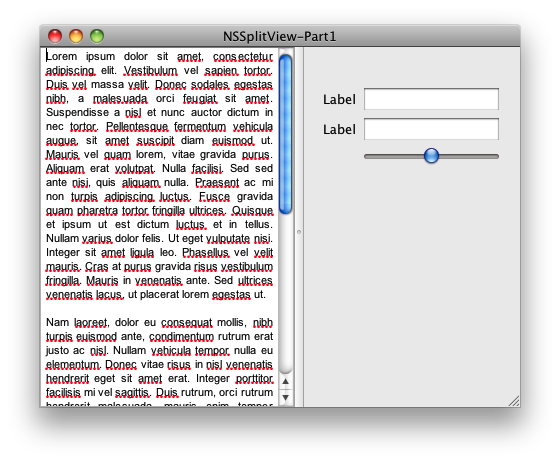
<p>The app looks like this:</p>

<p><img src="http://manicwave.com/blog/images/2009/12/NSSplitView-Part1-initial.png" alt="NSSplitView-Part1-initial.png" /></p>

<p>Dragging the divider all the way to the right and then back towards the middle
quickly borks up the autoresizing behavior.</p>

<p><img src="http://manicwave.com/blog/images/2009/12/NSSplitView-Part1-borked.png" alt="NSSplitView-Part1-borked.png" /></p>

<p>To end part 1 of this exploration, let's add minimum sizes for our split view.</p>

<p>We instantiate a new controller class, we'll call it MySplitViewController (as
it stands now, its just a delegate but we'll be adding other functionality to
it as we move along).</p>

<p>Instantiate an instance of this class in the XIB and hook the delegate outlet
of the NSSplitView outlet to the new class.</p>

<p>There are a bunch of optional methods declared in the NSSplitViewDelegate -
we'll implement only two. constrainMinCoordinate and constrainMaxCoordinate.
The documentation is sparse on the functionality of these methods, but the
header file for NSSplitView does a pretty good job of laying out the basics.</p>

<p>constrainMin... and constrainMax are called repeatedly while the divider is
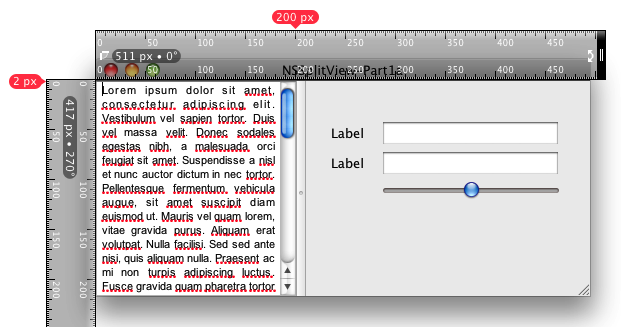
being dragged. In the example implementation, we'll answer proposedMinimum+200
for the constrainMinCoordinate call, which in our example will have the effect
of limiting the left subview to 200 pixels. Judicious use of NSLog will show
that the proposedMinimum will be 0 -- we're adding 200 and hence the minimum
position of the divider will be 200 pixels. When you begin having splitviews
with more than two subviews, the concept is the same, but you are now
responsible for determining which subview is being referenced. In our example
there is only one divider and its index will always be zero.</p>

<p>The constrainMaxCoordinate method works in a similar fashion. The splitview
sends in a proposedMaximumPosition that is the width of splitview - in this
case, the entire width of the window. We'll answer with that value - 100
resulting in a maximum divider position of the window width - 100 pixels.</p>

<pre><code>@implementation MySplitViewController  
/*
 * Controls the minimum size of the left subview (or top subview in a horizonal NSSplitView)
 */
- (CGFloat)splitView:(NSSplitView *)splitView constrainMinCoordinate:(CGFloat)proposedMinimumPosition ofSubviewAt:(NSInteger)dividerIndex;
{
    NSLog(@"%@:%s proposedMinimum: %f",[self class], _cmd, proposedMinimumPosition);
    return proposedMinimumPosition + 200;
}  
/*
 * Controls the minimum size of the right subview (or lower subview in a horizonal NSSplitView)
 */
- (CGFloat)splitView:(NSSplitView *)splitView constrainMaxCoordinate:(CGFloat)proposedMaximumPosition ofSubviewAt:(NSInteger)dividerIndex;
{
    NSLog(@"%@:%s proposedMaximum: %f",[self class], _cmd, proposedMaximumPosition);
    return proposedMaximumPosition - 100;
}
</code></pre>

<p><img src="http://manicwave.com/blog/images/2009/12/left-size-constrained.png" alt="left-size-constrained.png" /></p>

<p><img src="http://manicwave.com/blog/images/2009/12/right-size-constrained.png" alt="right-size-constrained.png" /></p>

<p>After compiling and running, we can now see that both the left and right
subview are indeed constrained. Although the 100 pixel extent of the right
view does not prevent the view from looking terrible, it does prevent the
autoresize funkiness of the first example.</p>

<h2>Conclusion and Next Steps</h2>

<p>We've only scratched the surface of NSSplitView. We limited the complexity of
our NSSplitView example to the simplest possible case and illustrated some of
the challenges in using NSSplitView. In the end, we were able to introduce a
few delegate methods that exert additional control over the behavior of
NSSplitView.</p>

<p>In the next article, we'll add support for collapsible subviews and then add
programatic collapsing. Additional topics for future posts will cover adding
animated adjustments, controlling the effective drag area, customizing
dividers and generalizing the solution.</p>

<p>The code for this segment can be downloaded here: <a href="https://github.com/jschilli/manicwave-samples/tree/master/NSSplitViewSamples">Part 1 Sample Projects</a></p>
]]></content>
    </entry>
  
    <entry>


<title type="html"><![CDATA[links for 2009-12-28]]></title>
<link href="http://manicwave.com/blog/2009/12/28/links-for-2009-12-28/"/>
<updated>2009-12-28T07:02:48-05:00</updated>
<id>http://manicwave.com/blog/2009/12/28/links-for-2009-12-28</id>
<category term="Links" />

      <content type="html"><![CDATA[<ul>
<li><a href="http://blog.0x1fff.com/2009/12/35-google-open-source-projects-that-you.html">0x1fff: 35 Google open-source projects that you probably don't know</a></li>
</ul>


<p>(tags: <a href="http://delicious.com/jschi/opensource">opensource</a>
<a href="http://delicious.com/jschi/google">google</a> <a href="http://delicious.com/jschi/text-processing">text-
processing</a>)</p>
]]></content>
    </entry>
  
    <entry>


<title type="html"><![CDATA[links for 2009-12-24]]></title>
<link href="http://manicwave.com/blog/2009/12/24/links-for-2009-12-24/"/>
<updated>2009-12-24T07:02:37-05:00</updated>
<id>http://manicwave.com/blog/2009/12/24/links-for-2009-12-24</id>
<category term="Links" />

      <content type="html"><![CDATA[<ul>
<li><a href="http://0xced.blogspot.com/2009/11/clalert-nsalert-done-right.html">0xced: CLAlert: NSAlert done right</a></li>
</ul>


<p>As you probably have guessed from the title of this post, I am not happy with
this behavior, so I have written a class, CLAlert (MIT License) that displays
alerts the way I think it should be done. I.e. a note icon for an
informational alert, a caution icon for a warning alert and a stop icon for a
critical alert as you can see on these screenshots.</p>

<p>(tags: <a href="http://delicious.com/jschi/cocoa">cocoa</a>
<a href="http://delicious.com/jschi/nsalert">nsalert</a>
<a href="http://delicious.com/jschi/mitlicense">mitlicense</a>
<a href="http://delicious.com/jschi/opensource">opensource</a>)</p>

<ul>
<li><a href="http://developer.casgrain.com/?p=94">Automatically localize your nibs when building</a></li>
</ul>


<p>When you want to localize your application, you can take several routes.</p>

<p>(tags: <a href="http://delicious.com/jschi/cocoa">cocoa</a>
<a href="http://delicious.com/jschi/l10n">l10n</a>
<a href="http://delicious.com/jschi/i18n">i18n</a>
<a href="http://delicious.com/jschi/tips">tips</a>
<a href="http://delicious.com/jschi/ibtool">ibtool</a>
<a href="http://delicious.com/jschi/genstrings">genstrings</a>)</p>
]]></content>
    </entry>
  
    <entry>


<title type="html"><![CDATA[links for 2009-12-23]]></title>
<link href="http://manicwave.com/blog/2009/12/23/links-for-2009-12-23/"/>
<updated>2009-12-23T07:03:36-05:00</updated>
<id>http://manicwave.com/blog/2009/12/23/links-for-2009-12-23</id>
<category term="Links" />

      <content type="html"><![CDATA[<ul>
<li><a href="http://jonsterling.github.com/2009/09/20/writing-mac-os-x-applications-in-smalltalk.html">Writing Mac OS X applications in Smalltalk</a></li>
</ul>


<p>What I really wanted was a version of Smalltalk that used the same object
modal as Objective-C, like Pragmatic Smalltalk of Etoilé, or even MacRuby on
Mac OS. Most of all, I wanted it to treat me like an adult: I don’t need a
class browser, thank you, I’m more comfortable working with plain-old files.
The persistent image construct in Smalltalk really makes me uncomfortable.</p>

<p>(tags: <a href="http://delicious.com/jschi/smalltalk">smalltalk</a>
<a href="http://delicious.com/jschi/cocoa">cocoa</a>
<a href="http://delicious.com/jschi/osx">osx</a>)</p>

<ul>
<li><a href="http://www.bdunagan.com/2008/11/10/cocoa-tutorial-source-list-badges-part-2/">fill the void – Cocoa Tutorial: Source List Badges, Part 2</a></li>
</ul>


<p>(tags: <a href="http://delicious.com/jschi/nstextcell">nstextcell</a>
<a href="http://delicious.com/jschi/cocoa">cocoa</a>
<a href="http://delicious.com/jschi/badge">badge</a>
<a href="http://delicious.com/jschi/customdrawing">customdrawing</a>)</p>

<ul>
<li><a href="http://www.ispirer.com/">Ispirer - Database and Application Migration Software</a></li>
</ul>


<p>(tags: <a href="http://delicious.com/jschi/database">database</a>
<a href="http://delicious.com/jschi/etl">etl</a>
<a href="http://delicious.com/jschi/conversion">conversion</a>
<a href="http://delicious.com/jschi/migration">migration</a>)</p>
]]></content>
    </entry>
  
</feed>